

How to Plan Out Your Freelance Website Content in Under an Hour

You need a website.
Whether you’re just starting out or have a steady stream of clients … there’s no way around it.
But, I understand how easy that project can slip to the back burner.
It’s one of those projects “you’ll get to once <fill in your excuse here>.”
But, how good would it feel to actually check that goal off your to-do list once and for all?
Well, today I’m going to show you how to plan out all the content for your new site … in under an hour.
Now, what we end up with may not be the final plan. But, it will be good enough to get you motivated to finish the job, so you can focus on what you do best — writing.
In fact, if you participate while you read today’s article, you could actually have your website up in a matter of days.
Ready? Grab a piece of paper and a pencil and let’s get down to business.
First tell me … what websites do YOU like?
First things first when writing your own website.
You need some inspiration, as well as a feel for what others are doing.
So, before you get started writing, look around for examples of other freelancer websites that you like.
Think of these sample websites as your “Swipe File.”
Once you’ve identified 3-5 websites that you like, write down the types of content you find on each site.
Note their navigation, and any other pages they drive you to from the homepage.
Also, keep a record of any color schemes or logos that you like — it will give you a head start when you plan out how your own website will look.
Next, brainstorm your main categories …
There are various ways you can document your ideas in this phase, but I prefer using a mindmap to organize my content.
Now, you can use mindmapping software if you have it, but oftentimes for projects like this I find it just as easy to map out my ideas on a blank piece of paper.
In the middle of the paper, write down the word “website” and draw a big circle around it.
And then around that circle, start jotting down all of the content you could possibly include on your website.
I’m talking about every detail that would make you stand out to a potential client. Experience, strengths, benefits of working with you … anything that sells you.
Don’t worry about editing at this stage … or determining if something is “strong enough” …
The purpose here is to get it all down on paper without any judgment.
Every time you write down a type of content, draw a circle around it.
So, for example, write down About Me. And then circle it.
Write FAQs, and circle it. Samples, circle it.
Some other circles you may write down include:
- Articles
- Clients
- Testimonials
- Speaking, training, or anything outside of copywriting
- Various niche experiences
- Specialties
Maybe you’ve just taken Jay White’s Email Copy Made Easy Program.
Or, you’ve specialized in SEO after taking Heather Lloyd-Martin’s SEO Copywriting Success.
Write all of that training down, too.
What you’ll end up with is a complete outline of all the categories of content you could potentially include on your website.
Here’s a sample mindmap up to this point:
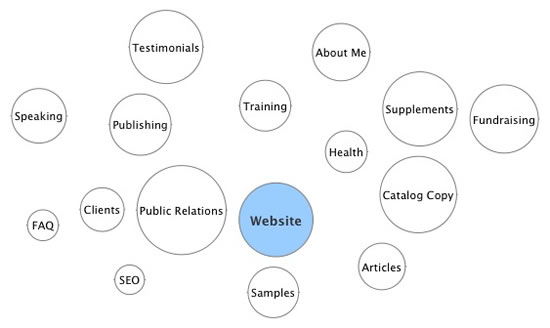
At this point, you’ve actually come pretty far in developing your own website.
Not that scary, right?
What if you don’t have any samples?
Or, what if you don’t have testimonials … or past clients … or any published articles?
Don’t worry about what you don’t have. Instead, focus on what you DO have.
That being said, if you WANT to include samples, it’s easy to do … even if you’ve never had a client in your life. Check out this webinar we did recently on building a professional portfolio of writing samples.
Another option is to focus on your experience or background instead.
Let me explain …
Let’s say you want to write for the green market. Instead of having a samples page, maybe you’ll have a Working Green page. And, on that page you talk all about how your office is totally green — you recycle everything possible, your office runs on wind power, and you’re completely paper-free.
See? Just focus on what you bring to the table.
Now you’re going to break it down …
Once you’ve exhausted all the main categories of content that you could include, I want you to think about each circle as if it’s a page of web copy you’re going to have to write.
So next to each one, write a short list of copy you could include.
For example …
About Me:
- Past work experience
- Hobbies
- Training
Samples:
- Vitamin assignment
- Spec for a supplement company
- Local yoga studio website
- Friend’s SEO project
Now, what you have is a framework of all the content you could potentially have on your website.
Everyone’s mindmap will look different at this point. There is no right or wrong, so don’t worry about comparing or having it evaluated.
Time to organize …
You most likely have a lot of different content on your mindmap. So, your job at this point is to organize it into six or so categories that are the strongest.
Remember, your website tells the client why she should hire you. So, evaluate each category on whether or not it’s strong enough to get that job done. Don’t worry if you end up missing a type of content “every other web writer has on their website.”
You want content that sells YOU!
So, step back and analyze your categories. Which are the strongest? Draw a square around those circles.
Which are the weakest categories at this point in your career? Draw a triangle around those circles.
You may find that two categories seem weak by themselves, but when combined become strong. Or, you may find that two categories — for example, your About Me and FAQ pages — are very similar and should be condensed into one.
Draw a line connecting the two circles, and then draw a square around the pair.
You may also find that some categories may need to become bigger.
Let’s say you wrote down online copywriting as a main category. And you see that you have plenty of content that you could write about, including your experience with PPC, SEO, and email copywriting.
Go ahead and pull those out and write them down as their own main categories. Draw a circle around them and see how they stand up against the other pages with squares around them.
The goal of the mindmap is to identify all of the potential content. And then from there, develop the final pages that do the best job of selling you.
The big moment is here …
You are about to put together your website’s navigation. Can you believe how painless this process truly was?
So, looking at your mindmap, what are going to be the 5-7 BEST possible pages you could put together from this content?
What will make the client say “WOW, I need this web writer working for me!”
Sample navigation:
- About Me
- FAQs
- Articles
- Testimonials
- My Writing Process
See? No samples on that website. But you wouldn’t even notice.
OK, pencils down.
You’ve done it. You have developed the navigation of your website, which in turn identifies the pages you need to write.
Final thoughts …
Your website is similar to a resume, but it’s much more fun and engaging. You’re not stuck in a template, or limited to one page.
Potential clients will want to see your website. So, make sure it does its job when they do view it.
Remember not to focus on what you don’t have. If you’re new, and you don’t have samples, it’s OK. Focus on your experience, your training, whatever makes you look good.
Plus, once you have samples you’re happy with, testimonials, more training, etc., you can easily add them to your website. That’s the beauty of a website – it can be changed at any time!
So now it’s time to get writing. And, in case you need help with the techie stuff, let me help you with that, too.
If you don’t yet have a website yet, or you want to build a better one, I recommend you check out my Build Your Freelance Website in Four Days.
Together, we can get you set up with a professional website that attracts your ideal clients and sells them on hiring you.
You don’t need any tech experience or expertise. I’ll walk you through all the steps so you can build your site, and learn how to make easy content updates any time you want.
I’ve helped hundreds of writers do it, and I can help you, too.

Build Your Freelance Website in Four Days
No matter what niche you’re in, if you’re a freelancer, you must have a website that showcases what you do. You can launch your own professional website in just 4 days. Experts show you every step. Learn More »

Thank you for this article, Rebecca -- this is exactly what I needed to read today! I'll have my site up in the next few days and will come back and post the link. That's a "pinky" promise!
~Pam
Pam Bodine –
Rebecca, I so appreciate your wisdom & experience.
Just completed the "Six Figure Copywriting" program and about to begin Nick Usborne's "Webcontent 2.0". This article could not have been more timely.
Merry Christmas and Thanks for Caring!
RDW
RDW –
Thank you, Rebecca, for your most timely and motivating piece!! I've been chipping away at my website, with no guidelines to follow, frustrated...until now! How'd you know :)
Laura J –
Thanks Rebecca.
Very nicely done. I've read tons of information about creating websites over the past 10 years, and yours is simpler and cleaner than 97% of them.
Good job!
Rod Newbound RN –
Excellent! Excellent as usual!
KB Johnson-Ohio –
Rebecca...I can't believe I missed this one back in December! Great information and actionable material. You're the best!
John Torre –
Wow everyone! I just came across this article and am blushing at these wonderful comments. Thank you for the motivation to keep writing more!
Rebecca Matter –
I am grateful for this article, the out line will really help me on my website. Thank you for all the great material at AWAI. This place is AWESOME!
Margaret from Follett Texas –
This is extremely helpful, thank you. I want to get started roght away. But first, I was wondering if anyone has any tips on a good site to start my own web page on? Without having to pay, preferably..
Kaeli Michelle –
Excellent Margaret! And Kaeli, are you referring to the platform you'll use to build your website? If so, there's no reason you can't use WordPress. It's free, easy to use, and once you choose a theme, you'll have everything you need to get your site up and running.
Rebecca Matter –
Just an addendum to Rebecca's last comment: if new to site building, use Wordpress.com, not Wordpress.org. The former allows easy and free blog/site building; the latter includes the need to download and host the platform and do a bunch of techie stuff with it. Not beginner techie stuff, either! :)
Jennifer
Jennifer Wenzel –
Rebecca,
I like the methodology of this article.
You walk us through the process and leave nothing to chance. Thanks.
I like the step-by-step instructions.
Luckily, for us you remembered PR as part of the marketing mix.
Sometimes, we forget the value of PR, although it is important.
Your reminder will hopefully have writers contact the media.
Free publicity can help your business with new opportunities by showcasing your products and services.
You have a persuasive writing style and can convey information succintly.
Cheers.
Archan Mehta –
Rebecca, This is incredible, i like the step by step explanation and now more than ever i can see that i need a website. It seemed very hard to set up one but not anymore after reading this article.
Thank you.
Martha –
Thanks Martha! I hope it helps you move forward with getting your website up and running.
Rebecca Matter –
Thank you Rebecca for sharing such valuable information with us. This is just the extra pull I needed to get out of the rut of just not knowing where to begin. Your instructions are simple yet powerful and your kindness is incredibly motivating. You have made a difference im my life today. Thanks to you and AWAI...I am working on my site and looking forward to my success as a freelancer and copywriter after not knowing where to begin. Now I am moving forward.
May God Bless You
Guest (Lena ) –
I'm speechless of tireless technical writing style creating, web-knowledge genius super-intelligent Rebecca Matter. She is the perfectly beautiful, non-arrogant, courteous, patient, kind, good sense of humor human God created. I'm admired of her perfections. Website building instruction by Rebecca is the first persuasion and assistance to drag ambitious copywriters to join in then become your numerous AWAI members. You're smart, restless, luring, and talented to succeed any subject you pursue.
Arabella Duong –
I am taking Nick Usbornes course for Money Making websites and have been having trouble creating the First Level Pages and subsequently any thing that would follow. I desperately searched for inspiration, but still hadn't found "the thing" that would help me. While reading your post I had a light bulb moment *DING, and pages were pouring out of me before I even began the exercise you recommended.
Thank you so much. I'll pay close attention to your informational posts in the future.
~ Danae
Guest (Danae) –
This is so awakening Rebecca.I've been lazing and procrastinating on this subject, but your information is so empowering; very persuasive, clear and straight to the point. It has given me a push, and I'm now left with no option other than getting up and start working on my website right away. Thank you very much Rebecca.
liza Chizzy –
Rebecca, thank you for this very helpful article. How to Plan Out Your Freelance Website Content in Under an Hour, and the article Seven Things You Must Have on Your Website (But Only If You Want Clients...) by Joshua Boswell, have provided a wealth of information to get my website set up and full of relevant content.
Rita Jeane Smith –
Great guidance here Rebecca. You make it nice and simple. I will be using a mind map and following your instruction here. Thank you for an informative post.
Debbie French –